Cart 0


Share
Table of Contents
APA Table of Contents: Crafting Structured Documents with Precision
A precisely formatted APA table of contents is the architectural blueprint of any serious academic document, from undergraduate term papers to doctoral dissertations. Within the first few pages, this organizational tool establishes professional credibility, demonstrates mastery of scholarly conventions, and provides an intuitive navigational roadmap for readers who may be evaluating your work under tight deadlines. The APA 7th edition offers specific guidelines that, when followed correctly, transform a simple list of chapters into a sophisticated hierarchical map of your research. This comprehensive guide delivers expert-level instruction on constructing an APA table of contents that meets rigorous academic standards. You will learn not only the mechanical rules of formatting—font selection, spacing requirements, and indentation protocols—but also the strategic principles of logical organization and parallel structure that elevate your document from adequate to exceptional. By the conclusion, you will possess the confidence to create a document that is both academically rigorous and intuitively accessible, ensuring your research is presented with the clarity and credibility it deserves.
Understanding the Strategic Importance of an APA Table of Contents
An APA table of contents serves as the first substantive interaction a reader has with your document’s intellectual structure. In academic contexts, where evaluators often skim for methodological rigor and logical flow, a precise table of contents signals meticulous preparation and attention to detail. This is not merely a bureaucratic requirement but a powerful tool for enhancing reader comprehension and retention. When you correctly label sections such as “Literature Review,” “Methodology,” and “Results,” you provide a mental framework before the reader even begins the introduction. This pre-organizational function is critical; cognitive psychology research demonstrates that readers retain information significantly better when they understand a document’s architecture upfront. Furthermore, a well-executed APA table of contents boosts your credibility by adhering to the style guide’s nuanced rules—rules that many novice writers overlook or dismiss as trivial. By mastering this element, you differentiate your work as professionally crafted, which can positively influence grading, peer review, or funding decisions. In short, the investment in a flawless table of contents pays substantial dividends in reader engagement and perceived authority.
The strategic importance extends beyond mere aesthetics. A thoughtfully constructed table of contents reveals the logical progression of your argument, showing how each section builds upon previous ones. For example, a well-structured table will clearly show that “Methodology” follows logically from “Literature Review” and that “Results” flows naturally from the methods described. This logical transparency helps evaluators quickly assess whether your research design is sound before they read the full text. Additionally, the table of contents serves as a quality control mechanism for the writer. As you build the hierarchical structure, you may discover gaps in your argument, sections that lack sufficient support, or redundancies that need elimination. This self-editing function is invaluable for producing a coherent, well-organized final document.
Core Formatting Rules for an APA Table of Contents
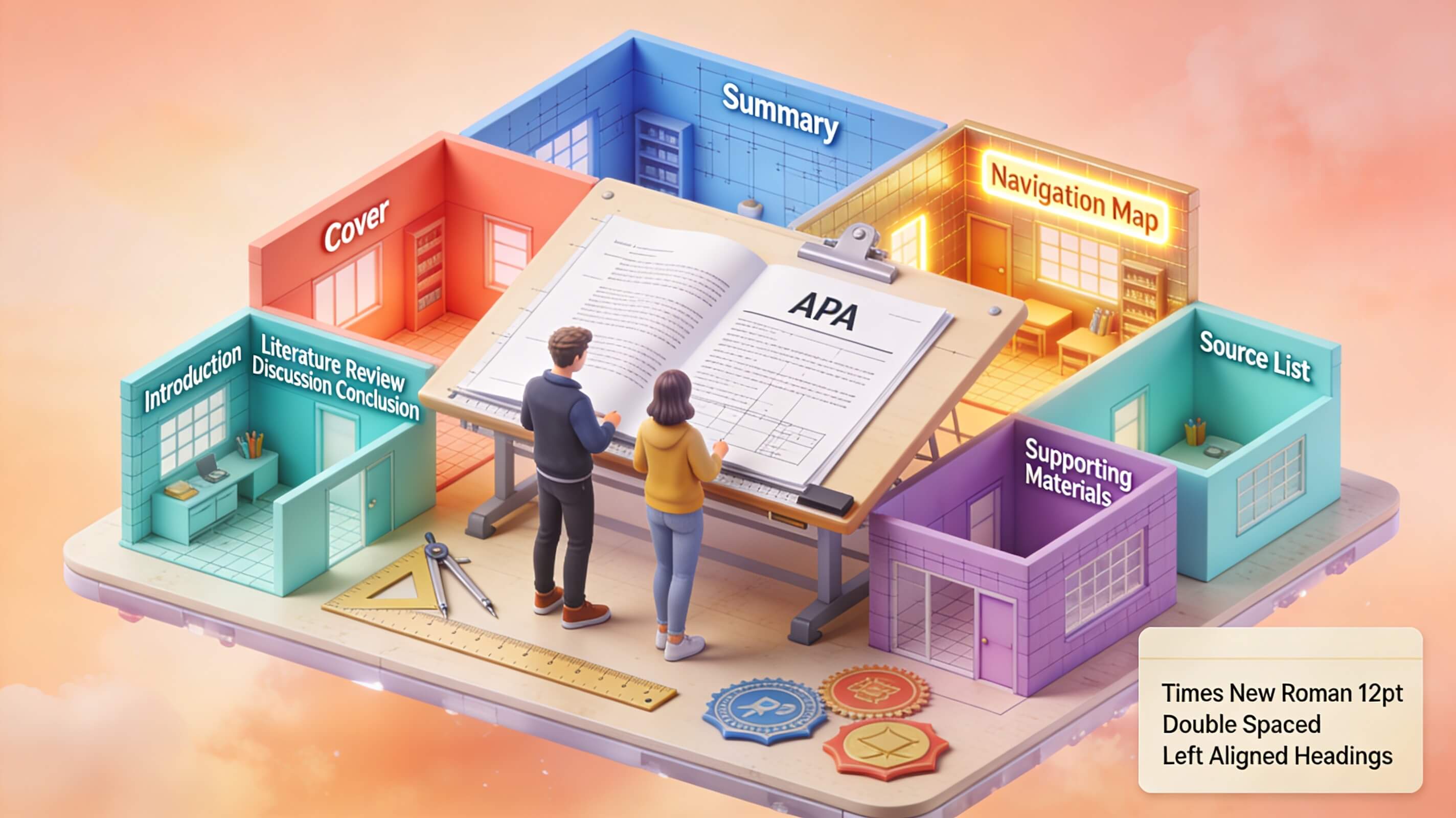
Mastering the formatting of an APA table of contents requires attention to several non-negotiable details. The APA 7th edition does not prescribe a single mandatory template for the table of contents itself, but it offers clear guidelines that are widely accepted in academic publishing. First, use a standard, readable font such as 12-point Times New Roman, 11-point Calibri, or 11-point Arial. Double-space the entire table of contents, including all headings and subheadings. The title “Table of Contents” should appear at the top of the page, centered, bolded, and in the same font size as your document’s major headings (typically 12-point). Do not italicize or underline this title.
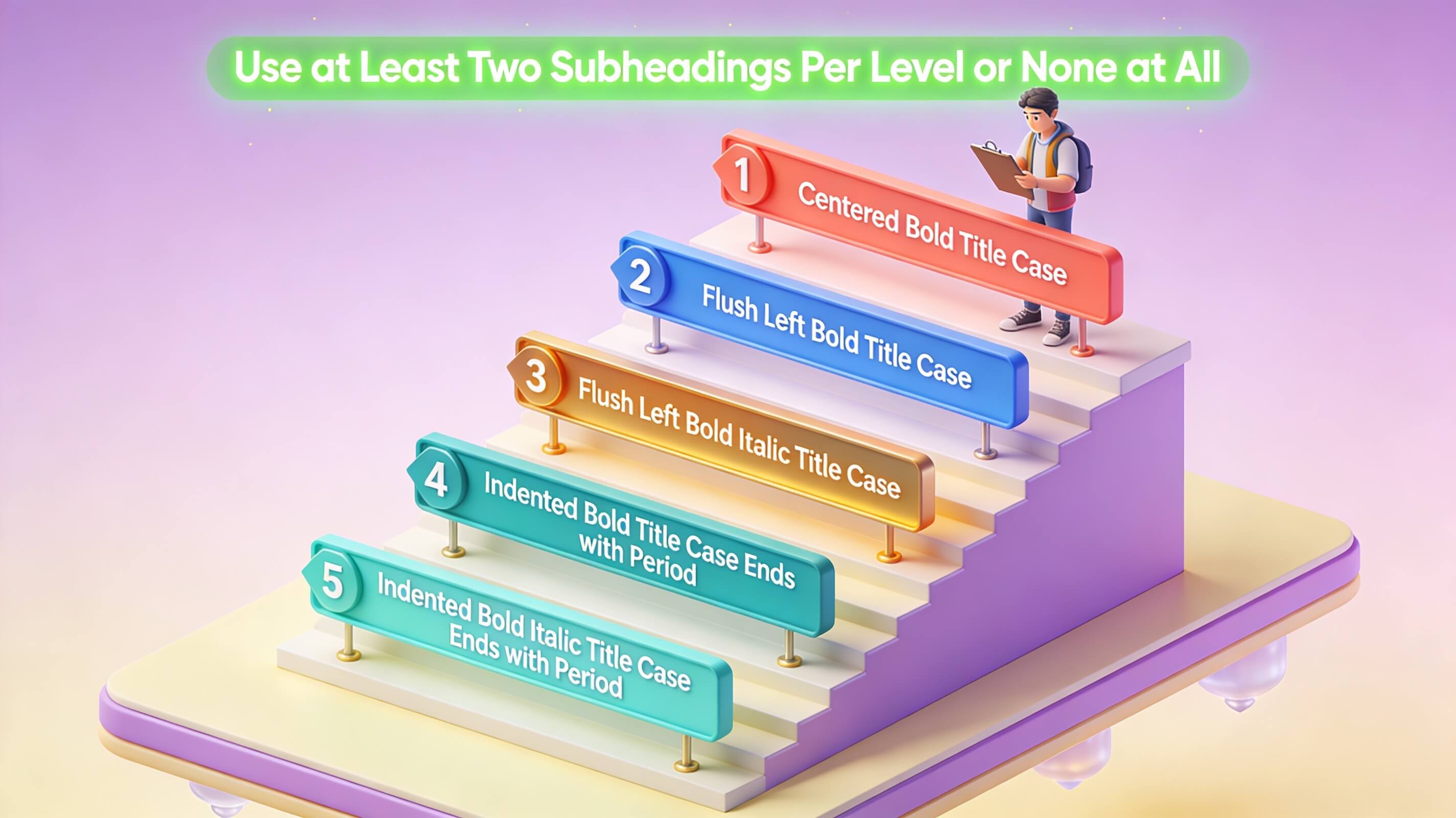
The critical formatting rule involves indentation to reflect the hierarchy of your headings. Level 1 headings (e.g., Introduction, Method) are flush left. Level 2 headings (e.g., Participants, Materials) are indented one tab (usually 0.5 inches). Level 3 headings are indented two tabs. This visual hierarchy immediately communicates the relationship between sections, allowing readers to understand at a glance which ideas are subordinate to others. Page numbers align right, and you should use a dot leader (a series of periods) between the heading text and the page number for ease of reading. Avoid using bold or italics for the headings within the table itself unless they are specifically formatted that way in the text. Consistency is paramount; every Level 1 heading in the table must correspond exactly to a Level 1 heading in the document, and the same applies for all subordinate levels.
Spacing within the table deserves careful attention. Each entry should be double-spaced, with no extra space between different heading levels. The dot leader should be consistent throughout, using a standard tab stop setting rather than manual periods. Many word processors allow you to set this automatically in the table of contents settings. Additionally, ensure that the table fits within standard one-inch margins on all sides, matching the rest of your document’s formatting. These details may seem minor, but they collectively contribute to a professional appearance that signals attention to scholarly conventions.
Common Formatting Pitfalls to Avoid
Many writers mistakenly include the table of contents itself as an entry. Do not list “Table of Contents” as an entry in its own table. Also, ensure that the abstract page is typically not included in the table of contents. The table should begin with the first major section of the document, such as the introduction. Another frequent error is inconsistent capitalization. In APA style, use title case for headings (capitalize major words) and ensure this is mirrored in the table. Do not mix sentence case with title case within the same table. Finally, verify that the page numbers in the table match the actual page numbers in the document. A discrepancy of even one page undermines the entire document’s credibility and suggests carelessness.
Additional pitfalls include incorrect handling of appendices and supplementary materials. Each appendix should be listed separately in the table of contents, with its title and page number. If you have multiple appendices, they should be labeled Appendix A, Appendix B, etc., and listed in the order they appear in the document. Another common error is failing to update the table after making final edits to the document. Always perform a final check after all revisions are complete, ensuring that every heading listed in the table corresponds to an actual heading in the text and that all page numbers are accurate. A single mismatch can cause evaluators to question the thoroughness of your entire work.
Writers also frequently struggle with the inclusion of lists of tables and figures. These lists should appear on separate pages after the table of contents but before the main text. Each list should follow the same formatting conventions as the table of contents, with entries double-spaced and using dot leaders. If your document contains both tables and figures, include separate lists for each, ordered by their appearance in the text. Neglecting these supplementary lists can make your document appear incomplete.
Utilizing an APA Table of Contents Template
Creating an APA table of contents from scratch can be tedious and error-prone. Leveraging a pre-built template is a strategic time-saver that also enforces consistency. Many universities provide Microsoft Word templates that are pre-formatted with the correct margins, fonts, and heading styles. These templates often include a pre-configured table of contents field that automatically generates the structure based on your document’s heading styles. When selecting a template, ensure it is explicitly labeled for APA 7th edition. Avoid generic academic templates that may use outdated formatting from earlier editions, which have different spacing and heading requirements.
A high-quality template will have the dot leader already set, the correct indentation levels defined, and the proper spacing applied. After applying the template, you can customize it by adding or removing sections to match your specific paper. However, be cautious: do not manually type page numbers into a template field. Instead, use Word’s “Update Field” feature to refresh the table after you finalize your document. Reputable sources for templates include the official APA Style website, university writing centers such as Purdue OWL, and Microsoft Office’s built-in templates. Always cross-reference the template’s output against the official APA manual to ensure compliance, as templates can sometimes contain errors or outdated settings.
When using a template, pay special attention to the heading styles it defines. Some templates may assign different fonts or sizes to Heading 1, Heading 2, and Heading 3 than what APA requires. You can easily modify these styles by right-clicking on the style in Word’s Styles pane and selecting “Modify.” Set the font, size, and spacing to match APA specifications. Additionally, check that the template’s page numbering system is correct, especially if your document includes front matter with Roman numerals. Templates from university writing centers are often more reliable than generic ones because they are designed specifically for academic use.
Step-by-Step: Creating an APA Table of Contents in Microsoft Word
Microsoft Word offers a robust, automated system for generating an APA table of contents. This process eliminates manual formatting and ensures that any future changes to headings or page numbers are instantly reflected. Follow these detailed steps for a professional result that saves time and reduces errors.
Step 1: Apply Heading Styles Consistently
This is the foundational step upon which everything else depends. Word’s table of contents generator relies on its built-in Heading Styles (Heading 1, Heading 2, Heading 3). Before you insert the table, you must apply these styles to every heading in your document systematically. Highlight your introduction heading and select “Heading 1” from the Styles group on the Home tab. Then, apply “Heading 2” to all subheadings (e.g., Participants, Procedure). Apply “Heading 3” to any sub-subheadings. Consistency is crucial; do not skip levels or apply a style to non-heading text. If you accidentally apply Heading 1 to a paragraph that is not a heading, it will appear incorrectly in your table of contents.
Modify the styles to match APA formatting if needed by right-clicking the style and selecting “Modify.” In the Modify Style dialog, you can change the font to Times New Roman, 12-point, set the spacing to double, and adjust the color to black. For Heading 1, you may want to add bold formatting, while Heading 2 and Heading 3 can remain plain or use italics as required by your specific APA guidelines. Save these modifications to ensure all future headings automatically follow APA formatting. This upfront investment pays dividends throughout the writing process.
Step 2: Insert the Table of Contents
Place your cursor on the page where you want the table to appear (typically after the title page and abstract). Navigate to the “References” tab on the Ribbon. Click the “Table of Contents” button. From the dropdown menu, select “Custom Table of Contents.” This opens a dialog box that gives you control over formatting. In this dialog, you can choose to show page numbers, right-align them, and select a tab leader (choose the dot leader for APA compliance). You can also specify how many heading levels to show (typically three for a thesis or dissertation, but you may need only two for a shorter paper).
Click “Options” to verify that Word is using the correct heading styles. By default, Heading 1 corresponds to level 1, Heading 2 to level 2, and so on. Ensure no other styles are included unless you have custom styles that should appear in the table. Click “OK” to close the Options dialog, then click “OK” again to insert the table. Word will automatically populate the table with all headings formatted according to your style settings, complete with dot leaders and right-aligned page numbers. If the table does not appear as expected, double-check that you have applied heading styles to all relevant sections.
Step 3: Update the Table of Contents
After you make edits to your document—adding a new section, changing a heading’s wording, or altering page breaks—your table of contents will become outdated. To update it, click anywhere inside the table. A small “Update Table” box will appear at the top of the table (or you can right-click and select “Update Field”). Choose “Update entire table” to capture all changes, including page numbers and new headings. This two-click process ensures your table remains accurate without manual intervention, saving you from tedious proofreading.
It is good practice to update the table immediately before submitting your document, after all final edits are complete. If you have made significant structural changes, such as moving entire sections, updating the table will reflect these changes instantly. However, be aware that updating the table will overwrite any manual formatting you may have applied to individual entries. Therefore, avoid manually adjusting the table’s formatting and instead modify the underlying heading styles or the table’s settings in the Custom Table of Contents dialog.
Mastering the Hierarchical Structure
The true art of an APA table of contents lies in its hierarchical structure. This structure must logically mirror the organization of your paper, creating a clear visual representation of how ideas relate to one another. A common mistake is creating a flat structure where all headings appear at the same level, obscuring the relationship between main points and supporting details. For example, in a research paper, “Methodology” is a Level 1 heading. Its subcomponents—”Participants,” “Materials,” “Procedure”—are Level 2 headings. If you have a specific subsection within “Procedure,” such as “Data Collection,” that becomes a Level 3 heading.
This nested structure aids reader comprehension by showing which ideas are subordinate to others. It also helps you, the writer, identify logical gaps or redundancies in your outline. When constructing your table, ensure that every Level 2 heading has a corresponding Level 1 parent. Avoid having a Level 2 heading without a Level 1 heading above it. Similarly, do not have a Level 3 heading unless you have at least two Level 2 headings in that section (APA style generally recommends avoiding single subsections). A well-structured table of contents reveals the intellectual scaffolding of your argument, demonstrating that you have thought carefully about the organization of your ideas.
Consider the following example of proper hierarchical structure for a psychology dissertation:
| Level | Heading Example | Indentation |
|---|---|---|
| Level 1 | Introduction | Flush left |
| Level 2 | Background of the Problem | 0.5 inches |
| Level 2 | Statement of the Problem | 0.5 inches |
| Level 3 | Research Questions | 1.0 inches |
| Level 3 | Hypotheses | 1.0 inches |
| Level 1 | Literature Review | Flush left |
| Level 2 | Theoretical Framework | 0.5 inches |
| Level 2 | Empirical Studies | 0.5 inches |
This table illustrates how proper indentation creates a visual hierarchy that readers can process instantly. The flush-left Level 1 headings mark major sections, while indented Level 2 and Level 3 headings show supporting details. This structure is not arbitrary; it reflects the logical organization of the paper itself, where each major section contains subsections that elaborate on specific aspects of the topic.
Crafting Effective Section Headings for Your Table
The headings you write for your paper directly populate your APA table of contents. Therefore, crafting effective headings is a dual-purpose task: they must accurately describe the content of the section and function well within the table’s limited space. First, use parallel structure. If one Level 1 heading is a noun phrase (“Literature Review”), all Level 1 headings should be noun phrases (“Methodology,” “Results,” “Discussion”). Avoid mixing verb phrases (“How We Collected Data”) with noun phrases. Parallel structure creates a sense of consistency and professionalism that evaluators notice.
Second, be specific but concise. A heading like “Analysis” is too vague; “Statistical Analysis of Variance” is better, but “Quantitative Data Analysis” is more precise and fits the table well. Avoid using abbreviations or acronyms unless they are standard in your field and widely recognized. If you must use an acronym, spell it out in the table entry the first time it appears. Third, ensure that the wording in the table matches the wording in the text exactly. If you change a heading in the text, you must update the table. This may seem obvious, but it is a common oversight that leads to discrepancies.
Finally, avoid using the same heading for two different sections. Each heading should be unique to prevent confusion. If you have two sections that both discuss “Data Collection,” differentiate them by adding context, such as “Data Collection: Surveys” and “Data Collection: Interviews.” A table of contents with clear, parallel, and precise headings demonstrates a high level of scholarly discipline and makes your document easier to navigate. Remember that your headings are the first thing evaluators see when they open your table of contents; make them count.
Advanced Techniques: Page Numbering and Section Breaks
A common source of frustration when creating an APA table of contents is managing page numbers, especially for front matter (abstract, table of contents itself, lists of figures). APA style requires that preliminary pages use lowercase Roman numerals (i, ii, iii), while the main body uses Arabic numerals (1, 2, 3). To implement this, you must use section breaks. Insert a section break after your title page and before the first page of the introduction. Then, in the footer of the preliminary section, unlink it from the subsequent section. Set the page number format for the preliminary section to Roman numerals. For the main body section, set it to Arabic numerals starting at 1.

This dual-numbering system is critical for a professional document. Your table of contents must then reflect this: the table itself should list the Roman numeral pages for front matter and Arabic pages for the main body. Failing to do so is a common error that instantly signals inexperience. Use Word’s “Page Number Format” dialog (accessed by right-clicking a page number) to configure these settings. Additionally, ensure that the first page of each major section (such as the introduction) starts on an odd-numbered page if your institution requires it for binding purposes. This may require inserting additional blank pages or adjusting section breaks.
Another advanced technique involves managing page numbers for appendices. Appendices often contain materials that may extend beyond the main document’s page numbering. In such cases, continue the Arabic numeral sequence from the main body into the appendices. If an appendix contains multiple pages, list the starting page number in the table of contents. For example, “Appendix A: Survey Instrument” might appear as “Appendix A: Survey Instrument … 45.” If the appendix spans multiple pages, the page number listed should be the first page of that appendix. This consistency helps readers locate materials quickly.
For documents with complex structures, such as dissertations with multiple volumes, you may need to use separate page numbering for each volume. In such cases, include volume information in the table of contents, such as “Volume 1: Chapters 1-3” and “Volume 2: Chapters 4-6.” This level of detail ensures that readers can navigate even the most extensive documents with ease.
Conclusion
Crafting a precise APA table of contents is a skill that separates the meticulous scholar from the casual writer. It is not a mere formality but a powerful tool for organizing your research, guiding your reader, and demonstrating your commitment to academic excellence. By mastering the formatting rules, leveraging automated tools like Microsoft Word’s heading styles, and applying strategic thinking to your hierarchical structure, you can create a document that is both professional and navigable. Remember that consistency in wording, capitalization, and indentation is non-negotiable. Always double-check your page numbers after making final edits, and ensure that your table of contents reflects the logical flow of your argument. This attention to detail will pay dividends in the credibility of your work. Now, apply these principles to your next paper and experience the difference a well-structured table of contents makes. For further guidance on advanced academic formatting, explore resources from the APA Style website or your university’s writing center. Your document deserves this level of precision. To take your academic writing to the next level, consider using professional formatting services that specialize in APA compliance, ensuring your work meets the highest standards of scholarly presentation.