Cart 0

Share
Table of Contents
What Bounce Rate is Good
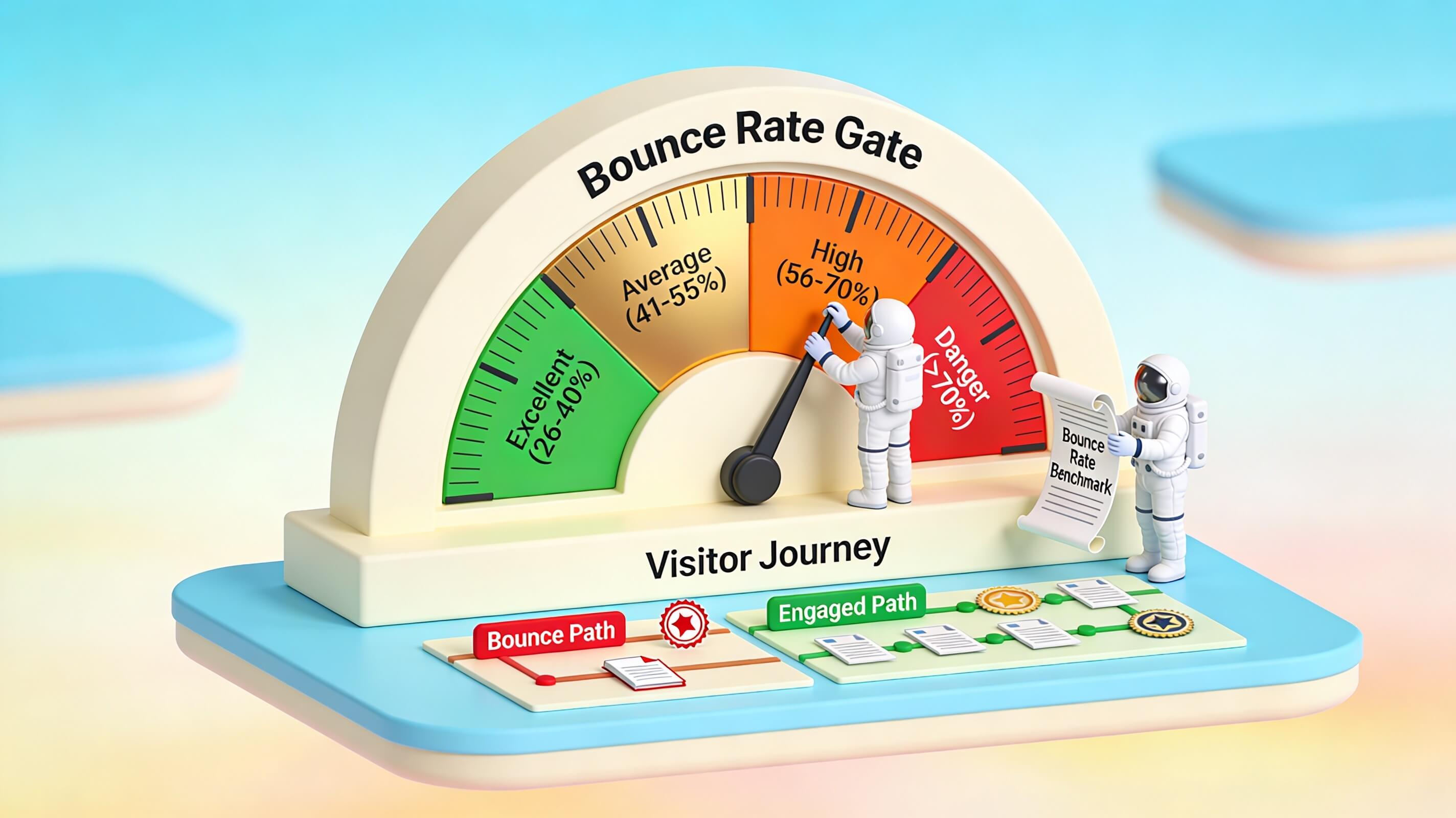
Understanding what bounce rate is good for your specific website is one of the most misunderstood yet critical performance metrics in digital marketing. A high bounce rate does not automatically signal failure, but it always warrants investigation. The short answer is that a bounce rate between 26% and 40% is generally considered excellent, 41% to 55% is average, and anything above 70% deserves a closer look. However, context is everything. Your industry, page type, traffic source, and how you define engagement all shape what a good bounce rate looks like for your situation. In Google Analytics 4 (GA4), the definition of bounce rate has fundamentally changed, making it more aligned with actual user engagement rather than simply counting single-page visits. This guide provides the latest benchmarks, explains the factors driving your numbers, and delivers proven strategies to improve your bounce rate without chasing vanity metrics. Whether you run an e-commerce store, a SaaS platform, or a content-heavy blog, these insights apply directly to your optimization efforts.
What Bounce Rate Is and How GA4 Calculates It
Bounce rate measures the percentage of sessions where a visitor lands on your website and leaves without meaningful engagement. In Universal Analytics (UA), a bounce was any session where the visitor viewed only one page, regardless of what they did on that page. A reader could spend ten minutes reading an entire blog post, scroll to the bottom, and leave satisfied, yet under UA, that session still counted as a bounce. This created misleading conclusions, especially for content-heavy sites where single-page visits are normal.
GA4 fixes this problem by tying bounce rate directly to engagement. A session in GA4 counts as “engaged” when it meets at least one of the following criteria: the session lasts longer than 10 seconds, the visitor views two or more pages or screens, or the visitor triggers at least one key event (such as a form submission, a purchase, a file download, or a CTA click). Any session that fails to meet all three thresholds is classified as a bounce. The formula is straightforward: Bounce Rate = (Unengaged Sessions ÷ Total Sessions) × 100. Because of this new definition, GA4 bounce rate is the mathematical inverse of engagement rate. If your site has a 62% engagement rate, your bounce rate is 38%. This is a significant conceptual shift that means GA4 bounce rates tend to be lower than the numbers you saw in UA for the same site and traffic. Always compare GA4 data against GA4 benchmarks to avoid misleading conclusions. The practical advantage is that GA4 rewards meaningful interaction—a visitor who spends 45 seconds reading your content, even on a single page, no longer counts as a bounce. This makes the metric far more useful for diagnosing actual engagement problems rather than simply flagging single-page visits.
What Bounce Rate Is Good for Your Website?
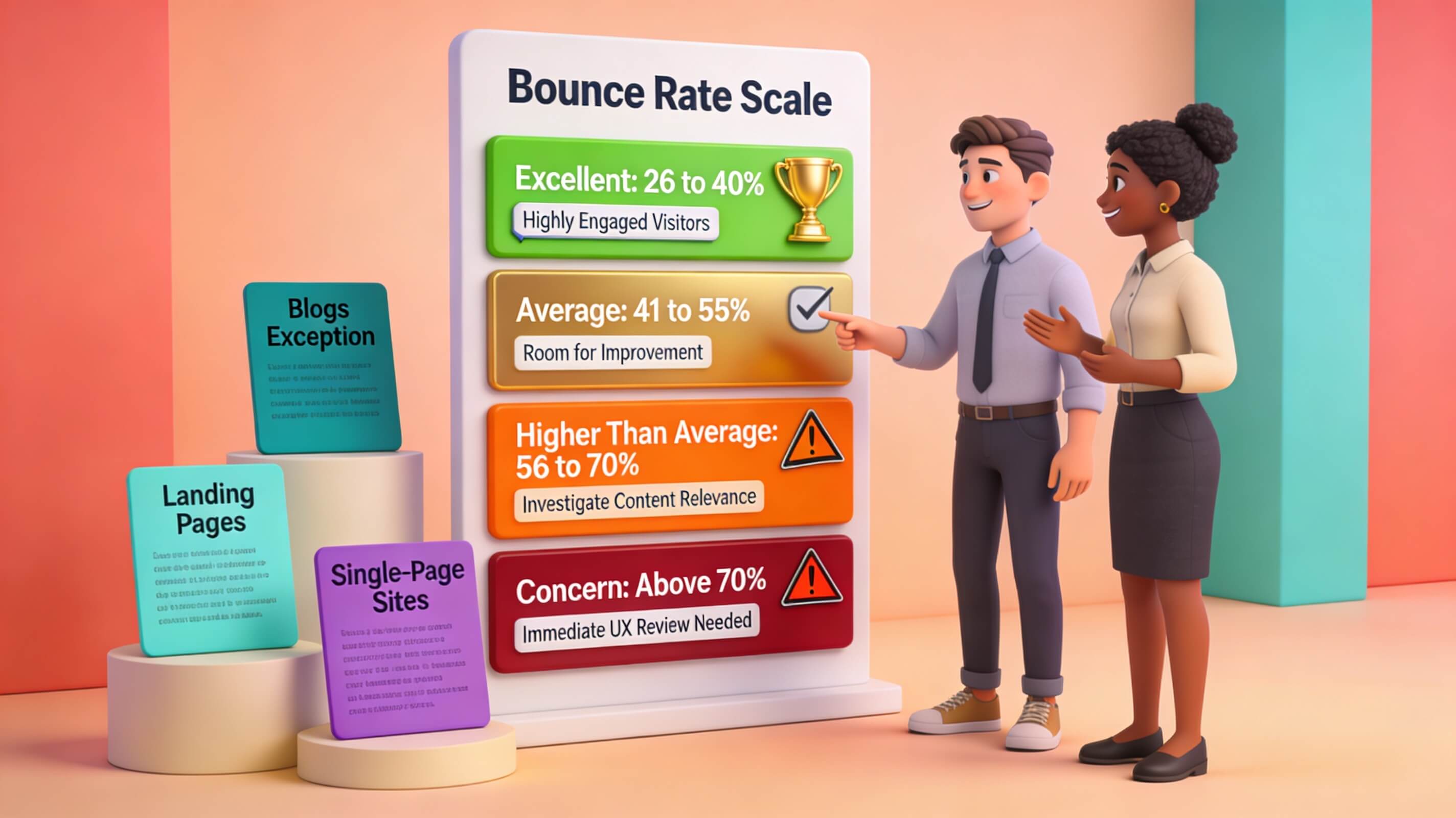
There is no universal “good” bounce rate. The number that signals healthy performance depends on your industry, the type of page, the intent behind the visit, and where your traffic comes from. Research from Semrush, HubSpot, and CXL provides a reliable general framework that most SEO professionals use as a starting point. A bounce rate of 26% to 40% is excellent and indicates strong engagement and content-visitor alignment. E-commerce sites, lead generation pages, and well-optimized service pages often fall here. The 41% to 55% range is average, and most websites land in this zone. It is perfectly acceptable for many page types, though there is room for improvement. Between 56% and 70%, the rate is higher than ideal for transactional or multi-page sites but common for blogs, news articles, and informational content where single-page sessions are expected. Anything above 70% is usually a red flag for e-commerce, SaaS, and lead generation sites. For blogs and content-only pages, however, this range can be normal. A recipe page that answers the searcher’s question in one visit will naturally bounce high, and that is fine.
Context is what separates useful analysis from panic. A 65% bounce rate on your blog might be perfectly healthy if the average time on page is three minutes and readers are scrolling to the end. That same 65% on a product category page where visitors are supposed to browse and add items to cart signals a real engagement problem that needs immediate attention. The smartest approach is to evaluate bounce rate alongside companion metrics: average engagement time, pages per session, scroll depth, and conversion rate. These numbers together tell you whether visitors are leaving frustrated or leaving satisfied. Bounce rate alone only tells you they left.
Bounce Rate Benchmarks by Industry and Page Type
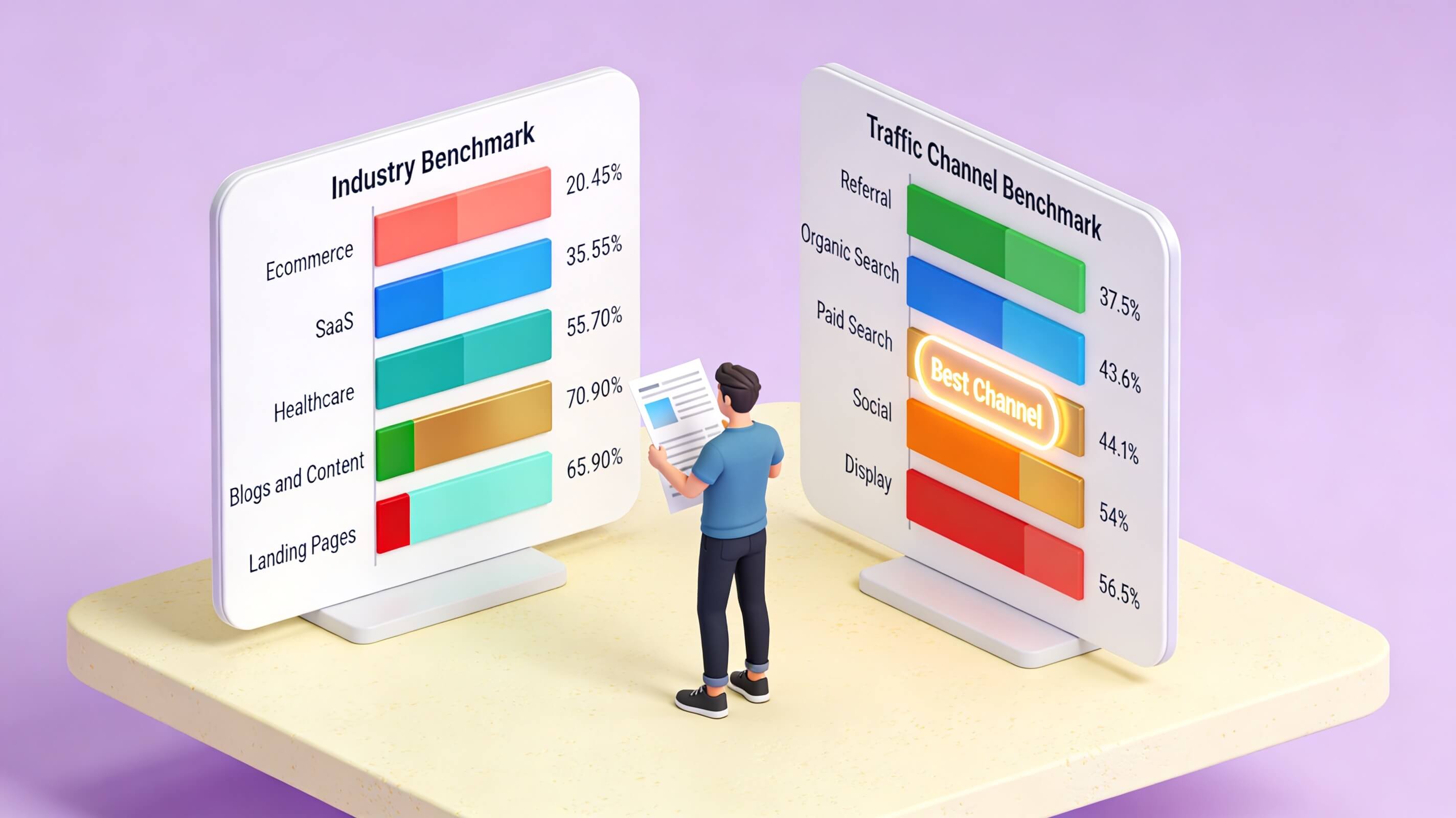
Comparing your bounce rate against industry averages gives you a realistic baseline for evaluation. What counts as “good” for an e-commerce store is very different from what counts as “good” for a media publication. The table below compiles 2024 benchmark data from CausalFunnel, HubSpot, and Databox research across GA4:
| Industry | Average Bounce Rate (GA4) |
|---|---|
| Retail & E-commerce | 20% – 45% |
| B2B Websites | 30% – 55% |
| Lead Generation | 30% – 55% |
| SaaS / Technology | 35% – 55% |
| B2C Websites | 35% – 60% |
| Service Businesses | 15% – 50% |
| Real Estate | 30% – 55% |
| Travel & Hospitality | 30% – 45% |
| Healthcare | 40% – 70% |
| Education & Nonprofits | 35% – 60% |
| Media & News | 60% – 85% |
| Blogs & Content Sites | 65% – 90% |
Page type also matters as much as industry. Landing pages designed for a single conversion action like a webinar signup often sit between 60% and 90%. Product pages with strong images, reviews, and related-item sections typically bounce at lower rates of 20% to 45% because they encourage browsing. Blog posts and informational articles naturally carry higher bounce rates because many visitors arrive, get their answer, and leave in a single session. When analyzing your own data, segment by page type and traffic source to get a clearer picture of where the real problems lie.
Why Bounce Rate Matters for SEO Performance
Google has never officially confirmed that bounce rate is a direct ranking factor. However, evidence from the 2023 Google antitrust trial and leaked internal documentation reveals that user interaction signals, including click satisfaction, dwell time, and return-to-SERP behavior, play a role in how search results are ranked. Google’s internal system known as NavBoost tracks whether users find what they need after clicking a search result or whether they quickly return to try another link. This “pogo-sticking” behavior functions as a quality signal, even if Google does not call it bounce rate.
The connection between bounce rate and SEO is indirect but powerful. A high bounce rate usually correlates with the same problems that do hurt rankings: slow load times, thin or irrelevant content, poor mobile optimization, and a mismatch between the page and the searcher’s intent. Fixing the root causes behind a high bounce rate, such as improving page speed, deepening content quality, and aligning pages with search intent, directly improves the engagement signals that Google’s systems actually measure. This creates a positive feedback loop. Better engagement leads to stronger ranking signals, which drives more qualified traffic from search, which further improves engagement metrics. The inverse is also true: ignoring a persistently high bounce rate allows a negative cycle to take hold, where declining engagement leads to weaker rankings, which brings in less targeted traffic, which pushes bounce rates even higher. From a practical SEO standpoint, bounce rate is best treated as a diagnostic tool rather than a ranking factor. It surfaces the symptoms, but the real work is treating the underlying causes.
Key Factors That Drive Bounce Rate Higher
Slow Page Load Speed
Page speed is the single most measurable factor behind high bounce rates. Data from Pingdom and Google’s own research shows the relationship clearly: sites that load in one second have an average bounce rate of 7%, sites that load in three seconds have an 11% bounce rate, and sites that load in five seconds see a 38% bounce rate. Google’s mobile speed report found that the probability of a bounce increases by 32% when load time goes from one second to three seconds, and by 123% when it reaches ten seconds. For every additional second of load time, you lose visitors at an accelerating rate. The impact extends beyond the initial bounce. Slow sites also reduce the likelihood of return visits. According to Unbounce research, 82% of consumers say slow page speeds influence their purchasing decisions. For e-commerce and lead generation sites, this means slow speed does not just lose one visit; it loses future visits and revenue.
Content-Intent Mismatch
When a visitor clicks a search result expecting a product comparison and lands on a generic brand page, they leave immediately. This mismatch between search intent and page content is one of the most common and most damaging causes of high bounce rates. It affects both organic and paid traffic. If your Google Ads promise one thing and your landing page delivers another, visitors bounce and your ad spend produces nothing. Fixing intent mismatch requires research before writing. Search your target keyword, study the top-ranking results, and identify the format, depth, and angle that searchers clearly want. If the top results are all detailed how-to guides and your page is a 200-word sales pitch, you have a fundamental content problem. Align your content structure, depth, and tone with what the searcher actually needs.
Poor Mobile Experience
Mobile devices account for over half of global web traffic. A site that looks great on desktop but breaks on mobile will lose a massive share of its visitors. Common mobile issues that spike bounce rates include unresponsive layouts, tiny tap targets that are difficult to press accurately, text that requires zooming, intrusive interstitials that block content, and slow mobile load times. Google’s Core Web Vitals framework directly measures the types of performance issues that cause mobile bounces. Largest Contentful Paint (LCP) tracks how quickly the main content loads. Interaction to Next Paint (INP) measures how responsive the page is to user interaction. Cumulative Layout Shift (CLS) captures unexpected layout movements that frustrate users. Failing these metrics not only increases bounce rates but also hurts search rankings directly, since Core Web Vitals are a confirmed Google ranking factor.
Weak or Confusing Navigation
If a visitor cannot figure out where to go next within a few seconds, they leave. Navigation problems take many forms: cluttered menus with too many options, unclear category labels, missing search functionality, inconsistent page hierarchy, and dead-end pages with no onward links. Each of these forces the visitor to think harder than they should, and most choose to leave rather than solve the puzzle. Effective navigation means reducing cognitive load. Use plain, descriptive labels. Limit top-level menu items to seven or fewer. Include a visible search bar on every page. Use breadcrumbs on deep pages so visitors always know where they are. These simple structural decisions prevent a surprising number of unnecessary bounces.
Intrusive Pop-ups and Interstitials
Full-screen pop-ups that appear before a visitor reads the first sentence are a proven engagement killer. While pop-ups can be effective conversion tools when used properly, aggressive timing destroys the user experience. Google’s own guidelines penalize intrusive interstitials on mobile, which means they can hurt both bounce rates and rankings simultaneously. The fix is simple: delay pop-ups until the visitor has scrolled at least 50% of the page or is showing exit-intent signals. Timed pop-ups triggered after 30 to 60 seconds of engagement perform significantly better than immediate overlays.
How to Improve Your Bounce Rate: Proven Strategies
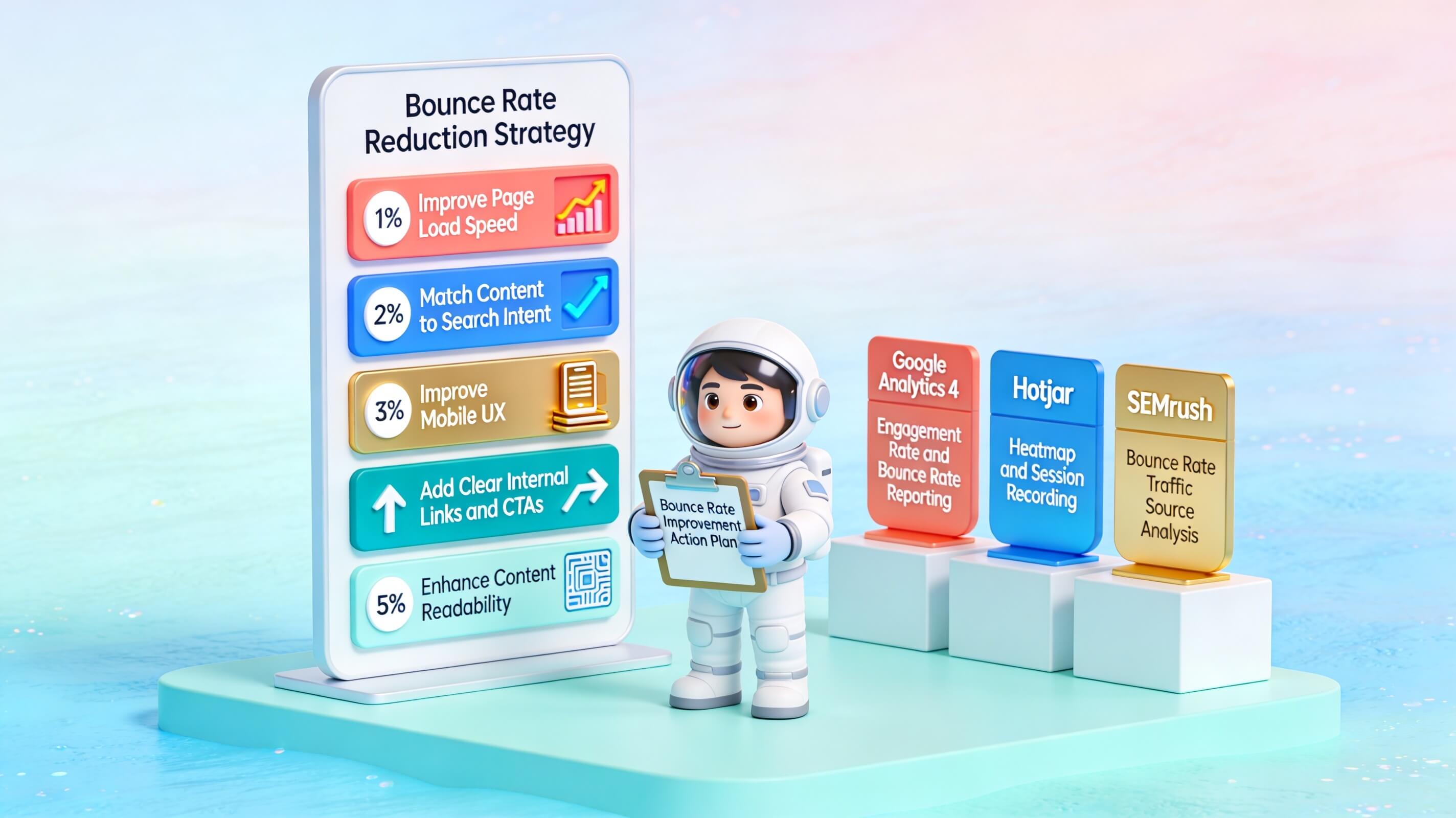
Optimize Page Load Speed
Start with speed because it affects every visitor on every page. Compress images using modern formats like WebP or AVIF, which deliver the same visual quality at a fraction of the file size. Minify CSS and JavaScript files to reduce render-blocking resources. Enable browser caching so returning visitors load pages faster. Implement a content delivery network (CDN) to serve assets from servers geographically closer to your visitors. Test regularly using Google PageSpeed Insights or GTmetrix, and aim for an LCP under 2.5 seconds and total page load under three seconds. For e-commerce sites, lazy-loading images below the fold can dramatically improve initial load performance without sacrificing visual quality. For content-heavy sites, consider implementing critical CSS loading so the above-the-fold content renders immediately while the rest of the stylesheet loads in the background.
Match Content to Search Intent
Before writing or rewriting any page, search the target keyword yourself and carefully study the top five results. What format do they use? What questions do they answer? What depth do they provide? If the top results are comprehensive comparison guides and your page is a brief product overview, you have an intent mismatch that no amount of speed optimization will fix. Structure your content to deliver exactly what the searcher expects, then exceed that expectation with additional depth, original data, or practical examples. Use clear subheadings that match common questions. Front-load the most important information so visitors see value immediately. This approach reduces bounces from visitors who land on your page and cannot quickly confirm that the content matches their need.
Strengthen Above-the-Fold Content
Visitors decide within the first five to ten seconds whether to stay or leave. Your headline must clearly communicate what the page offers and why it matters to the visitor. The first paragraph should deliver a specific promise, a useful insight, or a direct answer to the implied question. Avoid vague, generic introductions like “In today’s digital world…” or “Welcome to our comprehensive guide.” Lead with value. State the core takeaway upfront, then expand on the details below. Visual design above the fold matters too. A clean layout with readable fonts, adequate white space, and a clear visual hierarchy helps visitors orient themselves instantly. Cluttered designs with competing elements, auto-playing videos, and multiple banner ads create cognitive overload that drives quick exits.
Use Clear, Compelling Calls to Action
Every page should guide visitors toward a logical next step, whether that is reading a related article, signing up for a newsletter, requesting a demo, or adding a product to cart. Effective CTAs are specific, action-oriented, and placed where they naturally fit within the content flow. Use language like “Get Your Free SEO Audit” or “Compare All Plans” instead of generic “Click Here” or “Learn More” buttons. Placement matters as much as wording. A single CTA at the very bottom of a long article misses visitors who leave before reaching it. Consider placing contextual CTAs within the body content at natural transition points, as well as a sticky or floating CTA that remains accessible as the visitor scrolls. Test different placements and wording through A/B experiments to find what works best for your specific audience.
Build a Strong Internal Linking Structure
Internal links are one of the most underused tools for reducing bounce rate. Every contextual link to a related page on your site gives the visitor a reason to stay and explore deeper. A visitor who clicks through to a second page is no longer a bounce in any analytics definition. Beyond reducing bounces, internal links distribute page authority across your site, help search engines discover and index your content, and guide users through a logical content journey. Use descriptive anchor text that tells the reader what they will find on the linked page. Avoid generic anchors like “click here” or “read more.” Link from high-traffic pages to newer or underperforming content to pass link equity and increase visibility. Aim for three to five internal links per 1,000 words of content, placed where they naturally extend or support the current topic. Audit your internal links quarterly to catch and fix broken links that strand visitors on dead-end pages.
Ensure Full Mobile Responsiveness
Test your site on multiple devices and screen sizes. Use Google’s mobile testing tools to catch layout, usability, and performance issues. Pay specific attention to font sizes (minimum 16px for body text), button spacing (tap targets at least 48px apart), and layout stability (no unexpected shifts as the page loads). Mobile-first design is not a bonus feature; it is the baseline standard that users and search engines expect.
How to Analyze Bounce Rate in Google Analytics 4
GA4 does not display bounce rate in its default reports. You need to add it manually, which takes less than a minute but is essential for ongoing monitoring. Navigate to Reports > Engagement > Pages and Screens (or any standard report you want to customize). Click the pencil icon in the upper-right corner to enter customization mode. Select Metrics, then click Add Metric. Search for “Bounce Rate” in the search bar and add it to your report. Click Apply, then save the customized report so it persists for future visits. For more granular analysis, GA4’s Explore feature offers far more flexibility. Create a free-form exploration and add bounce rate as a value alongside dimensions like page path, session source/medium, device category, country, or landing page. This segmented view lets you identify exactly which pages, traffic sources, or devices produce the highest bounce rates, so you can prioritize fixes where they have the greatest impact.
When analyzing bounce rate, always review it alongside these companion metrics for a complete picture: engagement rate (the inverse of bounce rate, showing the percentage of sessions with meaningful interaction), average engagement time (how long engaged users actually spend on the page), key events or conversions (specific actions like sign-ups, purchases, downloads, or form submissions), and pages per session (indicating how deep visitors explore your site). A high bounce rate combined with a high average engagement time on remaining sessions suggests the page works well for those who stay but fails to capture a specific segment. A page with a moderate bounce rate but strong conversion rate is performing well despite the bounces. Segment your bounce rate data by traffic source to separate channel-level issues from site-level issues. A high bounce rate from social traffic but a normal rate from organic search usually means the page is fine; the social audience just has different intent. A uniformly high bounce rate across all channels points to an on-page problem that needs fixing.
Understanding Bounce Rate Fluctuations
Bounce rate is not a static number. It shifts based on seasonality, traffic mix changes, content updates, algorithm updates, and technical issues. Understanding why fluctuations happen helps you distinguish between normal variation and genuine problems that need intervention. Seasonal trends affect many industries. E-commerce sites often see higher bounce rates during peak shopping seasons like Black Friday or holiday periods when consumers comparison-shop across many stores. News and media sites experience spikes when viral stories bring in large volumes of casual, low-intent visitors from social platforms. These seasonal patterns are normal and expected. Track year-over-year trends rather than week-to-week to account for seasonality.
Traffic source shifts can change your overall bounce rate even when nothing on your site has changed. If a social media campaign suddenly drives a spike in traffic, and social traffic bounces at 54% while your organic traffic bounces at 43%, your blended site-wide bounce rate will rise. This does not mean your site got worse; it means your traffic mix changed. Always segment by source before drawing conclusions. Technical issues cause sudden, sharp changes. A broken page template, a new pop-up that blocks content on mobile, a server slowdown, or a CDN outage can spike your bounce rate overnight. Set up custom alerts in GA4 or use monitoring tools like Hotjar or UptimeRobot to catch behavioral and performance shifts in real time. Content updates and redesigns can move bounce rate in either direction. A content refresh that better matches search intent will lower bounce rates. A design change that inadvertently hides the main CTA or slows the page can increase them. Monitor bounce rate closely for two to four weeks after any significant change to catch unintended negative effects early. When you spot a sudden increase, investigate by filtering your data. Narrow by traffic source, device, browser, landing page, and geography to isolate the cause. More often than not, the problem is concentrated on a single page, a specific device type, or one traffic channel rather than a site-wide issue.
Conclusion
Bounce rate is a valuable metric, but it is not a universal measure of success or failure. The question “What bounce rate is good?” does not have a single numeric answer. A “good” bounce rate depends entirely on your industry, the type of page, the traffic source, and the user’s intent. A 90% bounce rate on a blog post that answers a quick question can be perfectly acceptable, while a 40% bounce rate on a checkout page signals a serious problem. Context is everything.
Throughout this article, we have explored the key factors that define a healthy bounce rate. We discussed how different industries have different benchmarks—from e-commerce sites that often see rates between 20% and 45% to content publishers where 60% to 80% is normal. We emphasized the importance of segmenting your data by traffic source, device, and landing page to get a true picture. We also covered the practical steps you can take to improve bounce rate when it is too high: optimizing page speed, improving readability, matching content to search intent, and ensuring a seamless mobile experience. Crucially, we highlighted that a sudden spike in bounce rate should trigger an investigation, not panic, and that testing and monitoring are essential for long-term improvement.
The most important takeaway is this: do not obsess over a single number. Instead, focus on understanding the behavior behind the metric. Ask yourself whether users are finding what they need, whether they are engaging with your content, and whether your site is meeting their expectations. A healthy bounce rate is one that aligns with your business goals and provides a good user experience. By using bounce rate as a diagnostic tool rather than a vanity metric, you can make informed decisions that truly improve your site’s performance. Ultimately, the best bounce rate is the one that supports your overall strategy—not a number you chase for its own sake.